> ## Documentation Index
> Fetch the complete documentation index at: https://docs.tokenomist.ai/llms.txt
> Use this file to discover all available pages before exploring further.
# Authentication
> How Tokenomist MCP authorizes your client with OAuth 2.1, the scopes it exposes, and how to resolve common sign-in issues.
Tokenomist MCP is protected by **OAuth 2.1** (with PKCE). The first time your client connects, you'll be redirected to a Tokenomist sign-in page to authorize access — after that, your client refreshes tokens silently.
## What you'll need
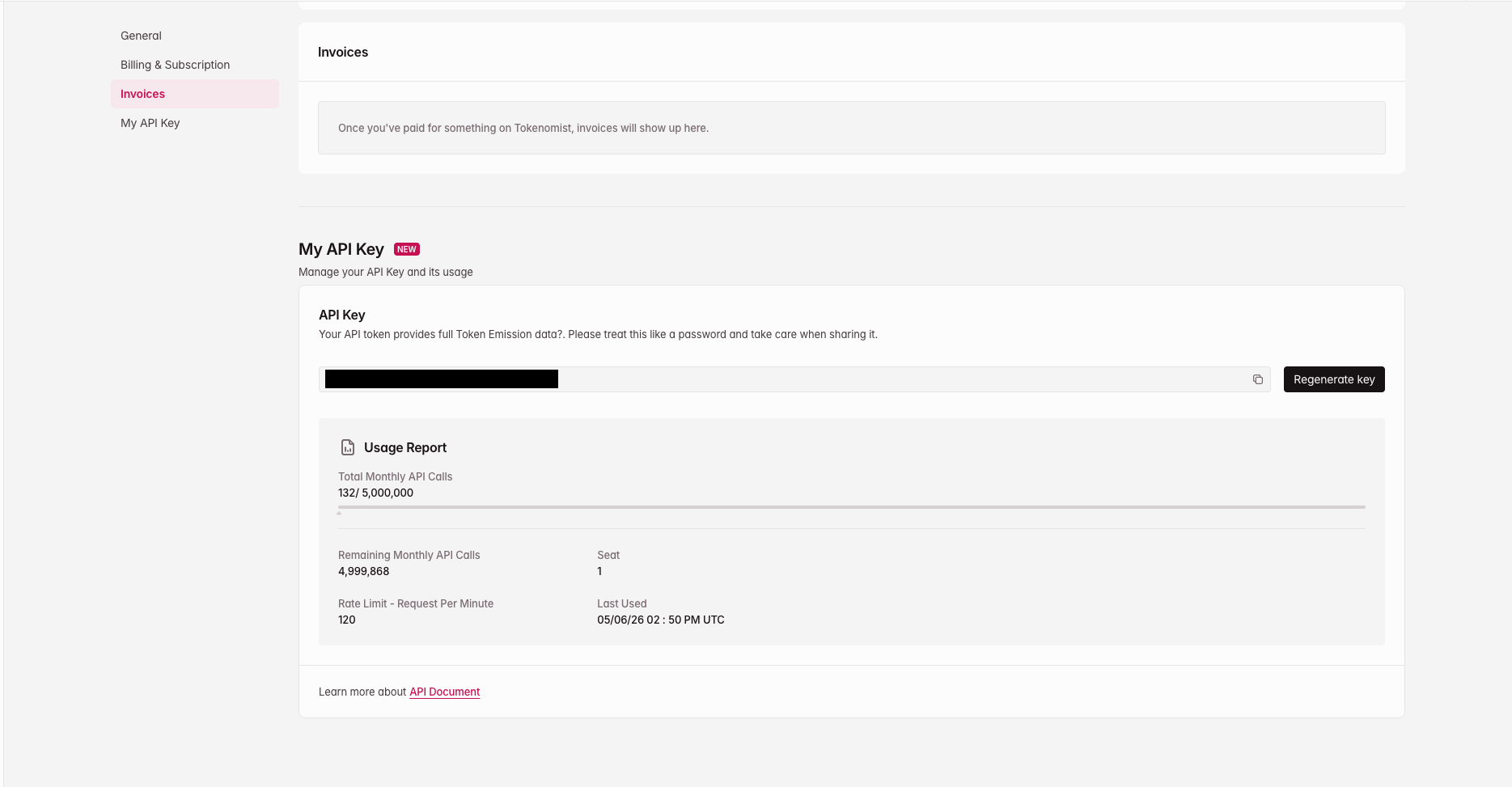
A **Tokenomist API key**. Find it at [tokenomist.ai/profile#my-api-key](https://tokenomist.ai/profile#my-api-key) under the **My API Key** section — copy it with the copy icon. If you don't have one yet, generate it there. Rotating your API key revokes existing MCP sessions.
 ## How the sign-in flow works
Add the Tokenomist MCP server to your client (see [Getting started](/mcp/getting-started#configuration)).
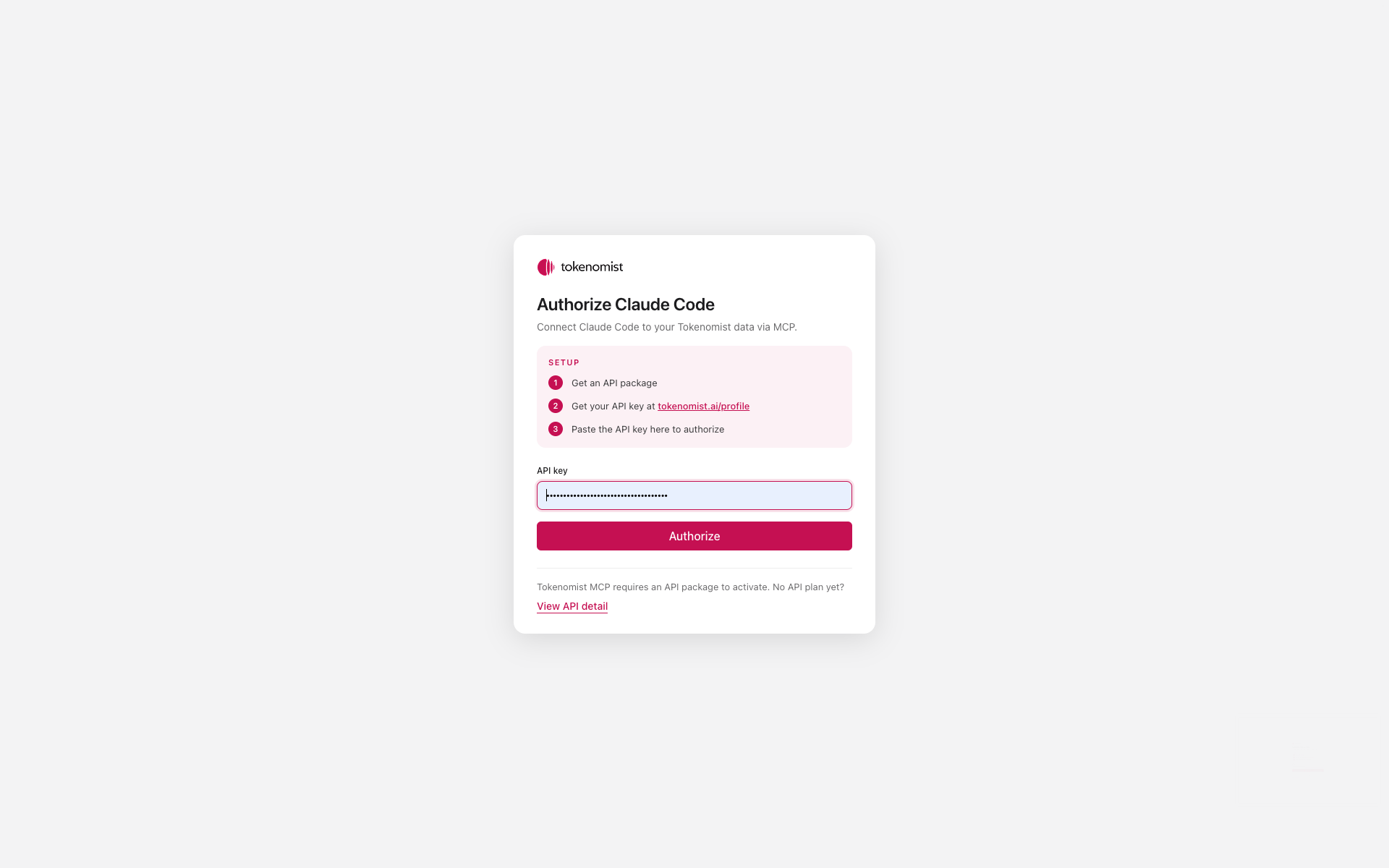
On first connection, your client automatically discovers that authorization is required and opens a browser tab to the Tokenomist sign-in page.
Paste your Tokenomist API key on that page and click **Authorize**.
## How the sign-in flow works
Add the Tokenomist MCP server to your client (see [Getting started](/mcp/getting-started#configuration)).
On first connection, your client automatically discovers that authorization is required and opens a browser tab to the Tokenomist sign-in page.
Paste your Tokenomist API key on that page and click **Authorize**.
 The browser redirects back to your MCP client, which now holds a short-lived access token. Refreshes happen silently in the background.
Subsequent tool calls happen automatically — no further prompts.
The browser flow only happens once per client + machine. If you reinstall your client, switch machines, or revoke your token, you'll be prompted to authorize again.
## Scopes
Two OAuth scopes are exposed:
* `mcp:read` — read tokenomics data via MCP tools (all current tools)
* `mcp:write` — reserved for future write tools
Most clients request both scopes by default. Modern MCP clients (Claude Desktop, Claude Code, ChatGPT, Cursor, etc.) handle OAuth discovery, registration, and token refresh automatically — no manual configuration required.
## Troubleshooting
Some clients only trigger the OAuth flow on the first tool call rather than at install time. Try sending a quick prompt like *"List tokens on Tokenomist"* — the sign-in page should open then.
Your access token may have expired without a successful refresh. In most clients you can re-run the connection step (Claude Desktop: restart the app; Claude Pro: re-enable the connector; Claude Code: run `/mcp`, select **tokenomist-mcp**, then **Authenticate**). You'll be sent through the sign-in page again.
Rotate your Tokenomist API key from your [account settings](https://tokenomist.ai). All existing MCP sessions tied to the old key are invalidated immediately. You'll be re-prompted on the next request from any connected client.
Expected. Tokens are stored locally per client + machine. Paste your API key on the sign-in page and you're back in.
Not yet — the current flow requires an interactive browser sign-in. Headless / service-account auth is on the roadmap.
The browser redirects back to your MCP client, which now holds a short-lived access token. Refreshes happen silently in the background.
Subsequent tool calls happen automatically — no further prompts.
The browser flow only happens once per client + machine. If you reinstall your client, switch machines, or revoke your token, you'll be prompted to authorize again.
## Scopes
Two OAuth scopes are exposed:
* `mcp:read` — read tokenomics data via MCP tools (all current tools)
* `mcp:write` — reserved for future write tools
Most clients request both scopes by default. Modern MCP clients (Claude Desktop, Claude Code, ChatGPT, Cursor, etc.) handle OAuth discovery, registration, and token refresh automatically — no manual configuration required.
## Troubleshooting
Some clients only trigger the OAuth flow on the first tool call rather than at install time. Try sending a quick prompt like *"List tokens on Tokenomist"* — the sign-in page should open then.
Your access token may have expired without a successful refresh. In most clients you can re-run the connection step (Claude Desktop: restart the app; Claude Pro: re-enable the connector; Claude Code: run `/mcp`, select **tokenomist-mcp**, then **Authenticate**). You'll be sent through the sign-in page again.
Rotate your Tokenomist API key from your [account settings](https://tokenomist.ai). All existing MCP sessions tied to the old key are invalidated immediately. You'll be re-prompted on the next request from any connected client.
Expected. Tokens are stored locally per client + machine. Paste your API key on the sign-in page and you're back in.
Not yet — the current flow requires an interactive browser sign-in. Headless / service-account auth is on the roadmap.