> ## Documentation Index
> Fetch the complete documentation index at: https://docs.tokenomist.ai/llms.txt
> Use this file to discover all available pages before exploring further.
# Setting up your API key
> Choose a plan and get your Tokenomist API key so you can start making requests.
Every request to the Tokenomist API is authenticated with an API key. This page
walks you through getting one. Once you have it, see
[Authentication](/api-documents/authentication) for how to send it with a request.
## 1. Choose a plan
API access is included with the **Pro**, **API**, and **Enterprise** plans.
* Browse plans and pricing on the [pricing page](https://tokenomist.ai/pricing).
* Want to try before subscribing? Request a
[free trial](https://docs.google.com/forms/d/e/1FAIpQLSebUG7Dq2mffAxoUfxbpSaN-GwUSB4vxmWA1PEobJlzcVesuw/viewform?usp=header).
* For custom timeframes, additional datasets, or commercial terms, contact
[consulting@tokenomist.ai](mailto:consulting@tokenomist.ai).
## 2. Find your API key
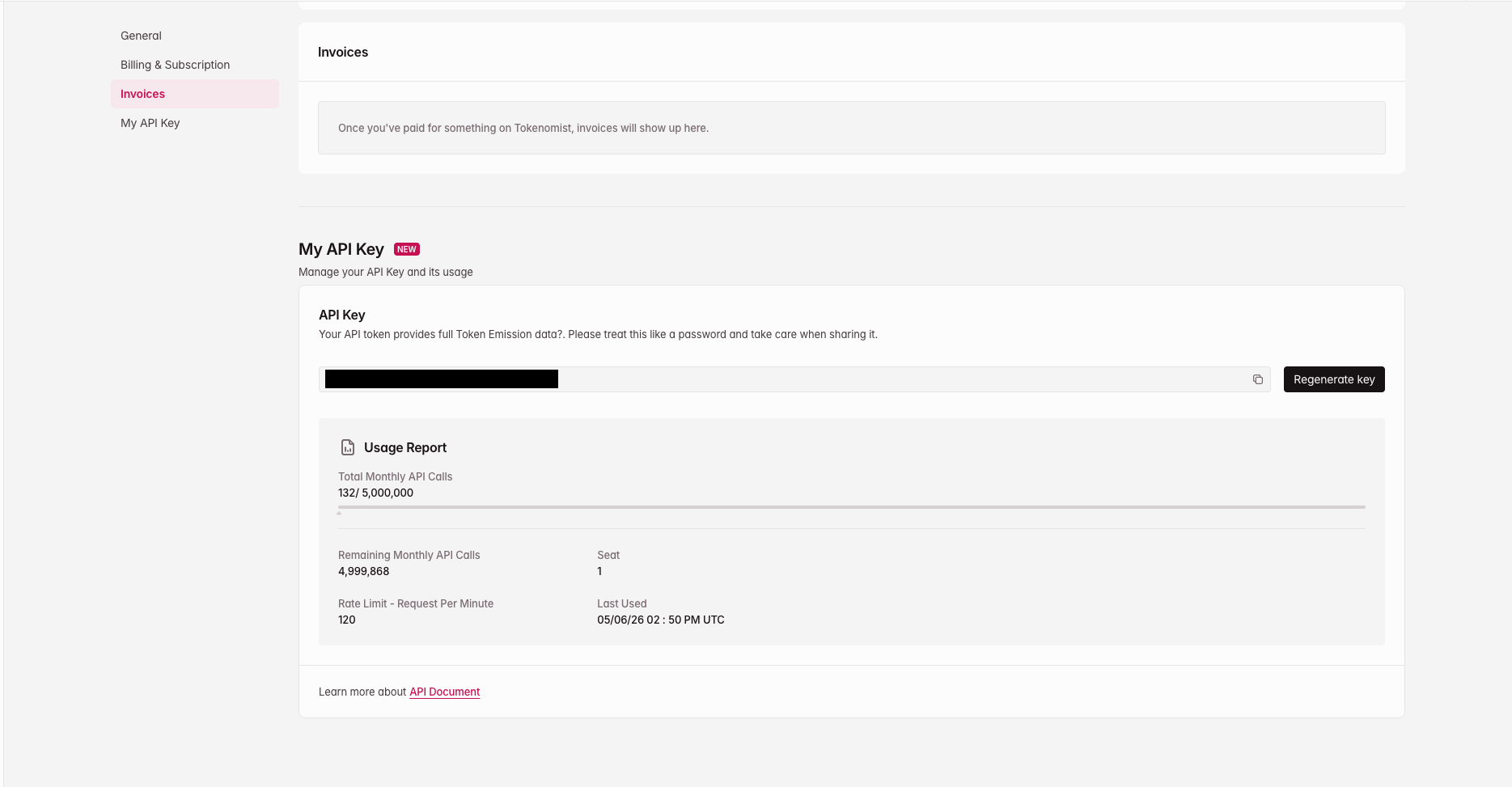
Once a plan is active, your key is available at
[tokenomist.ai/profile#my-api-key](https://tokenomist.ai/profile#my-api-key)
under the **My API Key** section. Copy it with the copy icon — if you don't have
one yet, generate it there.
 Treat your API key like a password. Don't commit it to source control, embed it
in client-side code, or share it publicly. Rotating your key from your profile
immediately invalidates the previous one.
## 3. Make your first request
Send the key in the `x-api-key` header:
```bash cURL theme={null}
curl https://api.tokenomist.ai/v5/token/list \
-H "x-api-key: YOUR_API_KEY"
```
```python Python theme={null}
import requests
resp = requests.get(
"https://api.tokenomist.ai/v5/token/list",
headers={"x-api-key": "YOUR_API_KEY"},
)
print(resp.json())
```
```typescript TypeScript theme={null}
const resp = await fetch("https://api.tokenomist.ai/v5/token/list", {
headers: { "x-api-key": "YOUR_API_KEY" },
});
const data = await resp.json();
```
Start with the [Token List](/api-documents/token-list/v5) endpoint to get a
`tokenId`, then use it to call the other endpoints.
Next: [Authentication](/api-documents/authentication) for the full request
reference and code samples in other languages.
Treat your API key like a password. Don't commit it to source control, embed it
in client-side code, or share it publicly. Rotating your key from your profile
immediately invalidates the previous one.
## 3. Make your first request
Send the key in the `x-api-key` header:
```bash cURL theme={null}
curl https://api.tokenomist.ai/v5/token/list \
-H "x-api-key: YOUR_API_KEY"
```
```python Python theme={null}
import requests
resp = requests.get(
"https://api.tokenomist.ai/v5/token/list",
headers={"x-api-key": "YOUR_API_KEY"},
)
print(resp.json())
```
```typescript TypeScript theme={null}
const resp = await fetch("https://api.tokenomist.ai/v5/token/list", {
headers: { "x-api-key": "YOUR_API_KEY" },
});
const data = await resp.json();
```
Start with the [Token List](/api-documents/token-list/v5) endpoint to get a
`tokenId`, then use it to call the other endpoints.
Next: [Authentication](/api-documents/authentication) for the full request
reference and code samples in other languages.