> ## Documentation Index
> Fetch the complete documentation index at: https://docs.tokenomist.ai/llms.txt
> Use this file to discover all available pages before exploring further.
# Allocation Screener ♕
> Scan token allocations across the entire market
This feature is only available to **Pro** users.
# Overview
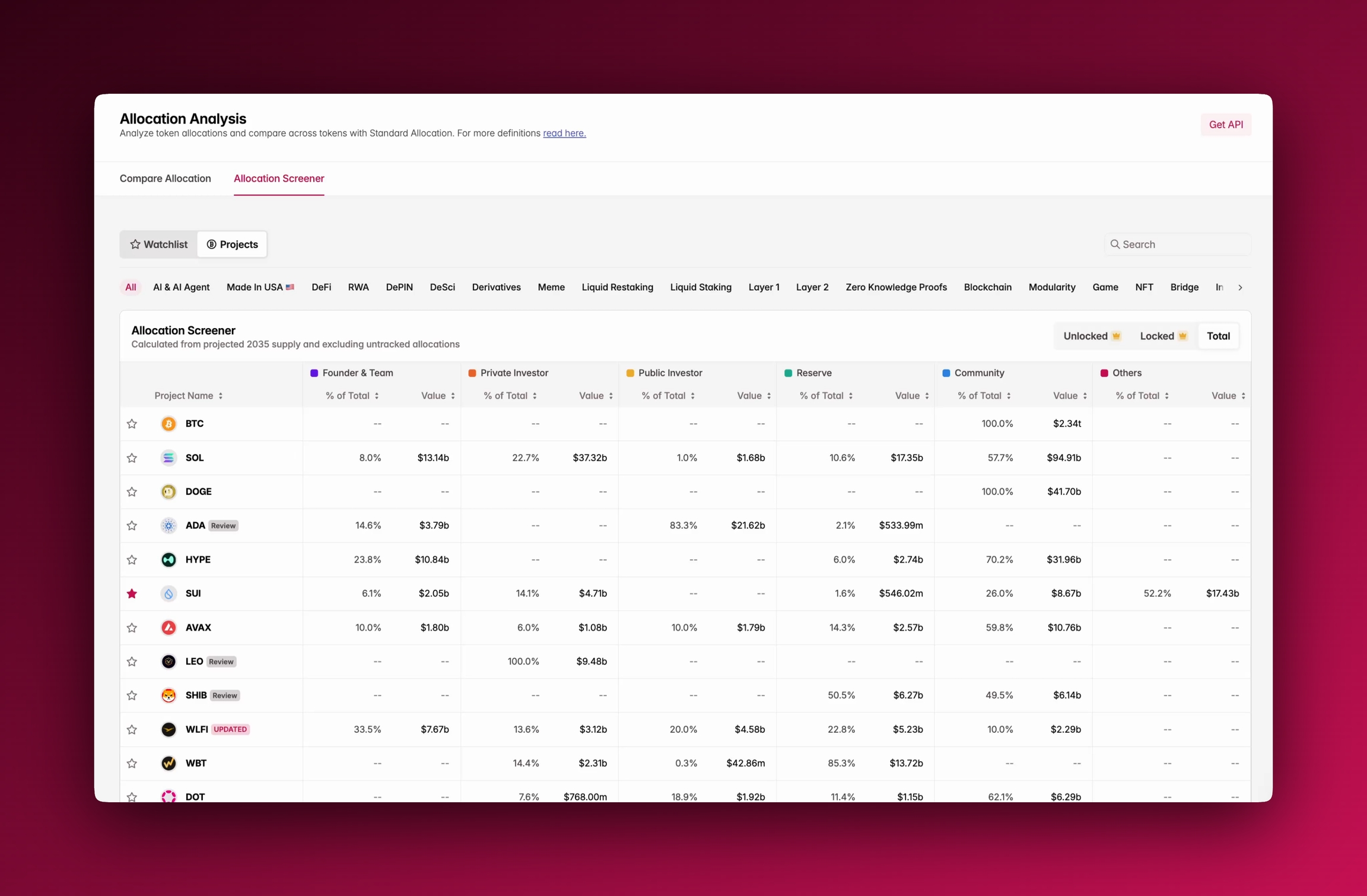
**Allocation Screener** gives you a market-wide, tabular overview of how projects allocate their tokens. Instead of analyzing one project at a time, you can scan the entire market and compare the *structure* of projects at scale — two projects may have the same emissions outlook, but if one is dominated by private investors while another leans heavily toward community, the long-term incentives and risks look very different. All data is standardized through Tokenomist's standard allocations framework.
 # Accessing Allocation Screener
You'll find **Allocation Screener** under the Allocation tab, next to Compare Allocation, or through the sidebar. It opens by default in **Total supply** view, but you can switch to **Unlocked** or **Locked** .
# Using Allocation Screener
The table lists projects row by row, with allocation categories shown as columns. For each category, you'll see both the **percentage of total supply** and the **value in USD**.
Filters at the top allow you to narrow results by sector (AI, DeFi, L1, L2, etc.), and with **Pro** you can toggle between unlocked, locked, and total distributions. The table is sortable by percentage or value, and fully searchable.
# Where To Next?
* See our methodology for classifying allocations in [group allocations](/group-allocations).
* Check out [supply metrics](/supply-metrics) to learn more about definitions of terms like circulating and unlocked supply.
* Learn more about how to use [compare allocation](/compare-allocation) in parallel with Allocation Screener.
# Accessing Allocation Screener
You'll find **Allocation Screener** under the Allocation tab, next to Compare Allocation, or through the sidebar. It opens by default in **Total supply** view, but you can switch to **Unlocked** or **Locked** .
# Using Allocation Screener
The table lists projects row by row, with allocation categories shown as columns. For each category, you'll see both the **percentage of total supply** and the **value in USD**.
Filters at the top allow you to narrow results by sector (AI, DeFi, L1, L2, etc.), and with **Pro** you can toggle between unlocked, locked, and total distributions. The table is sortable by percentage or value, and fully searchable.
# Where To Next?
* See our methodology for classifying allocations in [group allocations](/group-allocations).
* Check out [supply metrics](/supply-metrics) to learn more about definitions of terms like circulating and unlocked supply.
* Learn more about how to use [compare allocation](/compare-allocation) in parallel with Allocation Screener.